The Event Aggregator Pattern in .NET MAUI: Building Loosely Coupled Communication
The Event Aggregator Pattern in .NET MAUI
Building Loosely Coupled Communication
As your .NET MAUI app grows, direct references between ViewModels start becoming architectural debt.
Tightly coupled communication is one of the most common scaling problems in client applications. ViewModels referencing each other directly, services triggering UI logic, and navigation layers leaking state across the app. The Event Aggregator pattern solves this by introducing a centralized messaging hub that enables components to communicate without knowing about each other. Let’s break it down.
🧠 The Problem: Tight Coupling
Consider this scenario:
// ❌ Direct coupling
public class OrdersViewModel
{
    private readonly DashboardViewModel _dashboard;

    public OrdersViewModel(DashboardViewModel dashboard)
    {
        _dashboard = dashboard;
    }

    public void CompleteOrder()
    {
        _dashboard.RefreshStats();
    }
}
Problems:
- Hard dependency
- Breaks separation of concerns
- Difficult to test
- Hidden ripple effects
Now imagine 15 ViewModels interacting like this.
🎯 The Goal
We want: ✔ Decoupled communication
✔ No direct references
✔ Testable architecture
✔ Scalable message distribution
✔ Clear separation of concerns
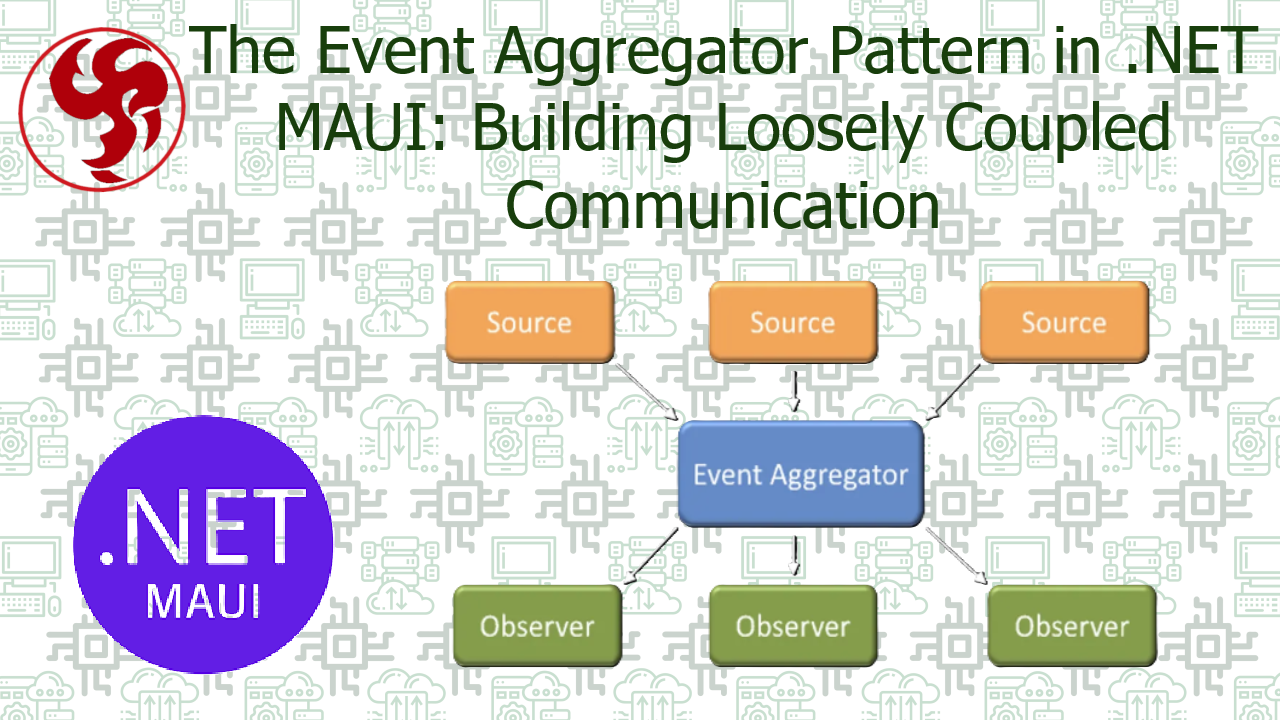
🧩 What Is the Event Aggregator Pattern?
An Event Aggregator is a mediator that:
- Allows publishers to broadcast events
- Allows subscribers to listen for events
- Removes direct dependencies between components
Think of it as:
A strongly-typed in-memory message bus.
🏗 Step 1 — Define the Event
Events are simple message objects.
public class OrderCompletedEvent
{
    public int OrderId { get; }

    public OrderCompletedEvent(int orderId)
    {
        OrderId = orderId;
    }
}
No logic. Just data.
🏗 Step 2 — Define the Event Aggregator Interface
public interface IEventAggregator
{
    void Publish<TEvent>(TEvent @event);
    void Subscribe<TEvent>(Action<TEvent> handler);
    void Unsubscribe<TEvent>(Action<TEvent> handler);
}
🏗 Step 3 — Implement the Aggregator
Minimal implementation:
public class EventAggregator : IEventAggregator
{
    private readonly Dictionary<Type, List<Delegate>> _subscriptions = new();

    public void Publish<TEvent>(TEvent @event)
    {
        if (_subscriptions.TryGetValue(typeof(TEvent), out var handlers))
        {
            foreach (var handler in handlers.Cast<Action<TEvent>>())
                handler(@event);
        }
    }

    public void Subscribe<TEvent>(Action<TEvent> handler)
    {
        if (!_subscriptions.ContainsKey(typeof(TEvent)))
            _subscriptions[typeof(TEvent)] = new List<Delegate>();

        _subscriptions[typeof(TEvent)].Add(handler);
    }

    public void Unsubscribe<TEvent>(Action<TEvent> handler)
    {
        if (_subscriptions.TryGetValue(typeof(TEvent), out var handlers))
            handlers.Remove(handler);
    }
}
Register it in DI:
builder.Services.AddSingleton<IEventAggregator, EventAggregator>();
🚀 Step 4 — Publish an Event
public class OrdersViewModel
{
    private readonly IEventAggregator _events;

    public OrdersViewModel(IEventAggregator events)
    {
        _events = events;
    }

    public void CompleteOrder(int orderId)
    {
        _events.Publish(new OrderCompletedEvent(orderId));
    }
}
👂 Step 5 — Subscribe to the Event
public class DashboardViewModel
{
    private readonly IEventAggregator _events;

    public DashboardViewModel(IEventAggregator events)
    {
        _events = events;
        _events.Subscribe<OrderCompletedEvent>(OnOrderCompleted);
    }

    private void OnOrderCompleted(OrderCompletedEvent evt)
    {
        RefreshStats();
    }
}
No reference between ViewModels. Clean.
🧠 Why This Matters in MAUI
In MAUI apps:
- Pages come and go
- ViewModels are short-lived
- Navigation stacks change
- Background services may trigger UI updates
Event Aggregator: ✔ Prevents navigation-based coupling
✔ Avoids service → UI references
✔ Simplifies cross-module communication
✔ Improves testability
⚠️ Important Considerations
1️⃣ Memory Leaks
If you don’t unsubscribe:
_events.Unsubscribe
You risk retaining ViewModels in memory. Better approach:
- Use weak references
- Or integrate IDisposable pattern
2️⃣ Thread Safety
If publishing from background threads:
- Ensure handlers marshal back to MainThread
Example:
MainThread.BeginInvokeOnMainThread(() =>
{
    RefreshStats();
});
3️⃣ Avoid Event Chaos
Event Aggregator is powerful. But: ❌ Don’t turn everything into events
❌ Don’t use it for direct command flows
❌ Don’t hide core business logic inside handlers Use it for: ✔ Cross-cutting notifications
✔ State changes
✔ Domain events
✔ Decoupled reactions
🆚 Event Aggregator vs MessagingCenter
Older Xamarin.Forms apps used:
MessagingCenter.Send(...)
In MAUI:
- MessagingCenter is deprecated.
- Event Aggregator is strongly typed.
- Cleaner and testable.
- Better suited for DI.
🧪 Testing Becomes Simple
You can mock:
var mockEvents = new Mock<IEventAggregator>();
And verify:
mockEvents.Verify(x => x.Publish(It.IsAny<OrderCompletedEvent>()));
Clean unit tests.
🏁 Final Thoughts
The Event Aggregator pattern:
- Reduces architectural friction
- Encourages modular design
- Enables scalable ViewModel communication
- Improves long-term maintainability
In small apps, you may not need it. In growing MAUI applications? It becomes architectural glue. And when used correctly: It disappears — which is exactly what good architecture should do.
Was this useful?
Sign in to react. Guest comments are still welcome.
Related Posts

Comments (0)
No approved comments yet.